Reconnect Your Bank Account
Restore an expired bank link in four quick steps
Every so often, your bank drops its connection to Duti — after a password change, a bank security update, or simply because a few months have passed. While the link is down, deposits and auto-pay stop working, so reconnect as soon as you spot it. The whole fix takes about a minute.
Spot the expired connection
When you open the deposit sheet, look at the From card. If your bank shows a blue Reconnect label, the link has expired. Don't worry if the Available Balance reads $0.00 — your money is fine; the app just can't see your balance while the connection is down.
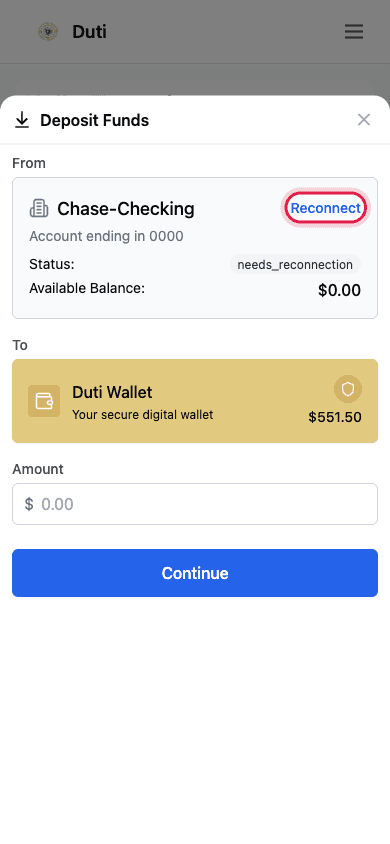
A Reconnect label and a $0.00 balance mean the bank link has expired — your money is untouched.
Tap Reconnect Bank Account
Tap the Reconnect label and a Reconnect Bank Account window opens, explaining that your bank connection has expired. Tap the blue Reconnect Bank Account button to start the secure reconnection.
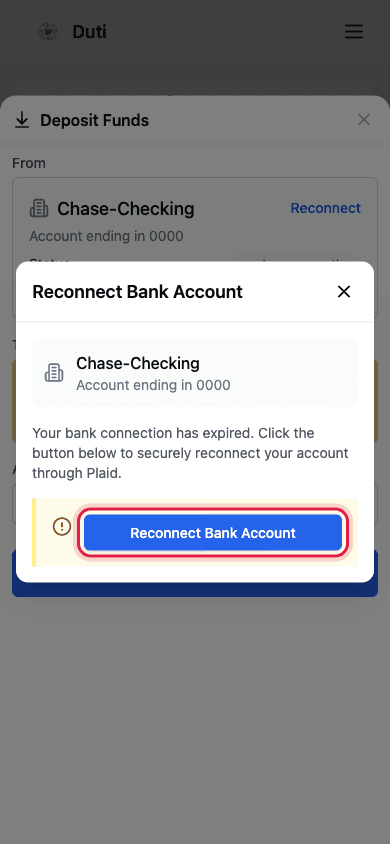
One tap starts the secure reconnection through Plaid.
Sign in through Plaid
Plaid — the secure service Duti uses to talk to your bank — opens next. Tap Continue, and your bank's own sign-in page opens in a new tab. Log in there exactly as you normally would, approve sharing with Duti, and you'll be brought back automatically.
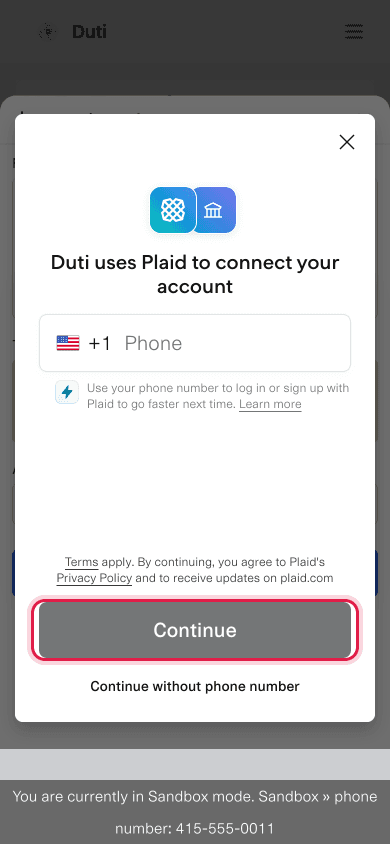
Plaid is the secure service Duti uses — your own bank's login opens next; sign in as usual, approve, and you're brought back automatically.
- Tap Continue — Plaid handles the secure hand-off
- Your bank's own sign-in page opens in a new tab — log in like you normally would
- Approve sharing with Duti and you'll return to the app automatically
Confirm it's fixed
Back in the deposit sheet, the same From card now shows a connected status and your real available balance again. That's your all-clear — deposits and auto-pay resume working right away.
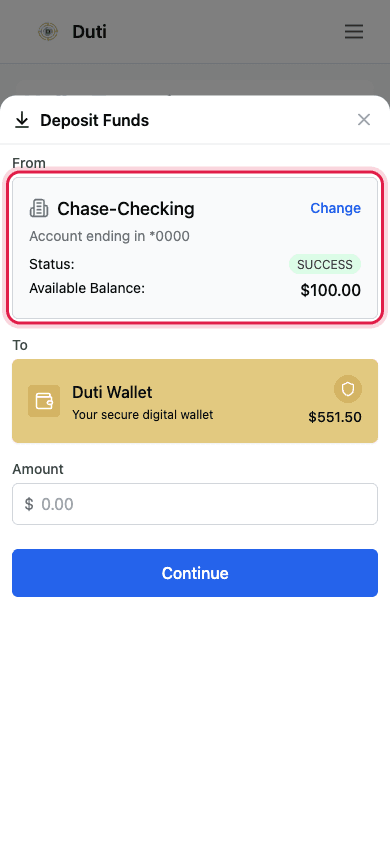
A SUCCESS status and a live balance mean you're reconnected — deposits and auto-pay work again.
Good to Know
Why this happens
Banks expire connections periodically — after a password change or by their own security policy. It's routine, not an error you caused.
What breaks while disconnected
Deposits and auto-pay withdrawals will fail until you reconnect — treat the Reconnect label as urgent.
Your credentials stay with your bank
Duti never sees your bank password. The login happens on your bank's own page through Plaid.
Do it before the due date
If auto-pay is on, reconnect as soon as you notice so the next automatic payment doesn't fail.
Common Questions
It varies by bank — some expire connections every few months, others rarely. Whenever you see the Reconnect label, do it right then.
Retry once first. If it still fails, contact support — some banks need a fresh link instead: remove the account and re-add it.
Not while the bank is disconnected. Reconnect first, then check that your Auto-Pay section shows active again.
Yes — reconnection uses Plaid, the same secure service that linked your bank originally. Your credentials go only to your bank, never to Duti.