Pay Circle Dues from Your Wallet
Send your monthly payment in four taps
Every session, you pay your circle dues straight from your Duti Wallet. This guide walks you through the whole payment — choosing your circle, checking the amount Duti calculates for you, adding an optional bid, and making sure the payment was recorded.
Tap “Send Money”
Open your Duti Wallet and check the Current Balance at the top — it needs to cover this session's payment. If it's short, tap Deposit first: money from your bank takes 1–2 business days to arrive, so fund your wallet a few days before the due date. When your balance is ready, tap Send Money.
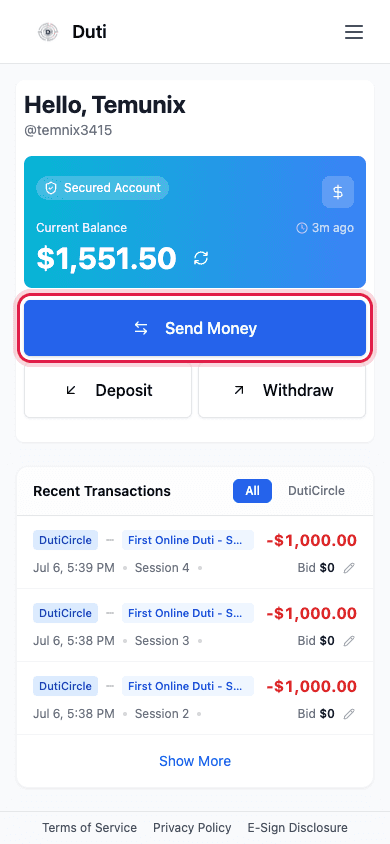
Your balance sits above the Send Money button — make sure it covers your dues.
Choose your circle
Switch to the Circles tab and tap the circle you're paying into. You can also search by circle name or code.

Only circles you belong to appear under Your Duti Circles.
Check the amount — it's calculated for you
Duti fills in exactly what you owe for the session shown, and the field is locked so you can't send the wrong amount. If you're behind on payments, a Catch-up Payment note explains that you're paying your oldest unpaid session first.
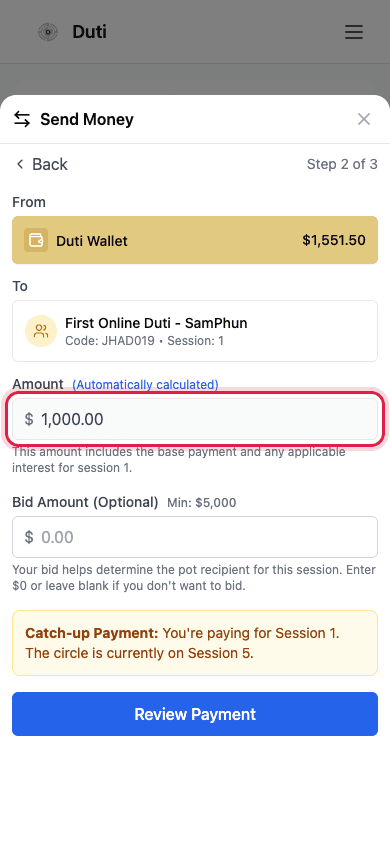
The amount is locked: base payment plus any interest for your session.
- The amount = your circle's base payment + any interest for that session
- The session number under the circle name shows which session you're paying
- A Catch-up Payment note means you're behind — Duti settles your oldest unpaid session first
Add a bid (optional)
If bidding is open, you can enter a bid in the same payment to compete for this session's payout. It must be at least the minimum shown next to the field. Don't want to bid? Leave it blank or $0 — your dues payment goes through either way.
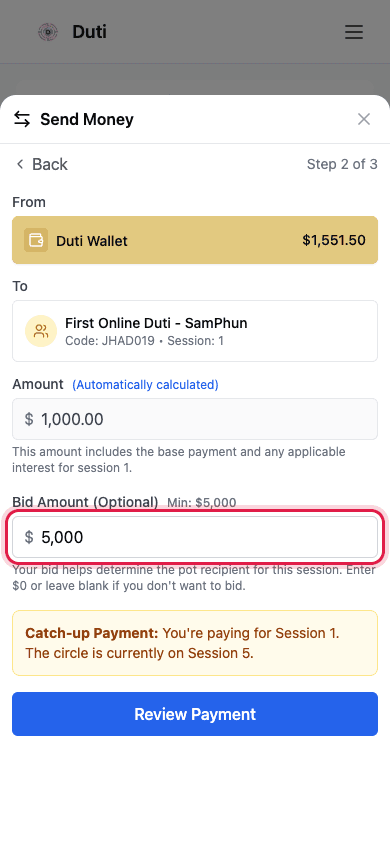
A bid rides along with your payment — it is not a separate charge.
Review and confirm
The confirmation screen shows everything in one place: the amount, your wallet balance, the circle, the session number, and your bid. Processing says Instant because wallet-to-circle payments don't wait on a bank. When it all looks right, tap Confirm Transaction.
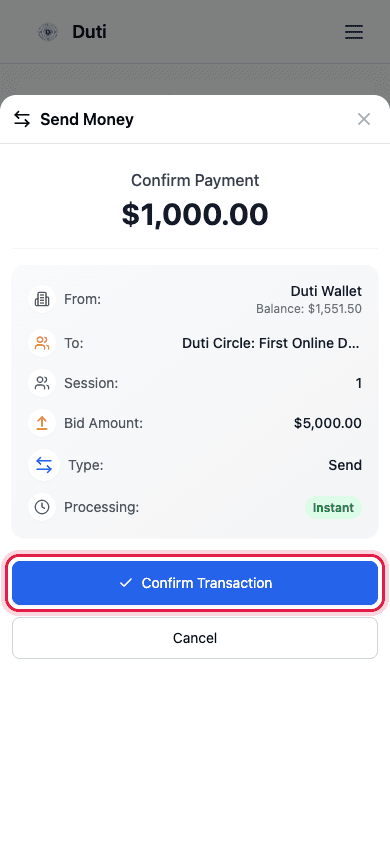
Check circle, session, and total — then tap Confirm Transaction.
Make sure it was recorded
After you confirm, the sheet closes and your payment appears at the top of Recent Transactions with its session number and your bid. That entry is your receipt — if it's there, your payment is being tracked.
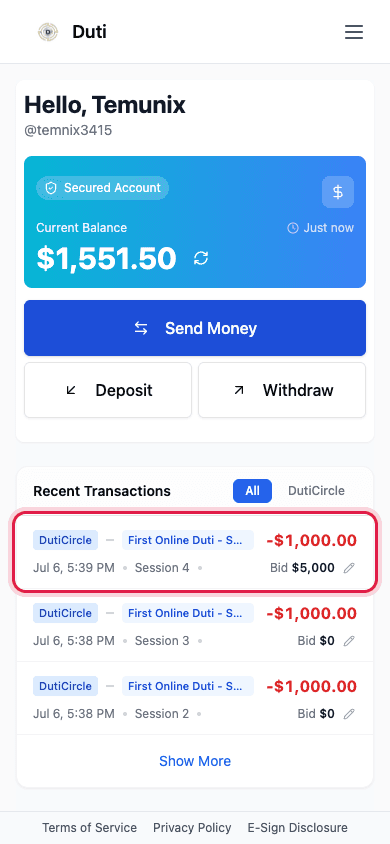
Your payment shows in Recent Transactions with the session and bid it was recorded against.
Good to Know
Fund your wallet ahead
Bank deposits take 1–2 business days to reach your wallet. Top up a few days before your circle's due date.
The amount is fixed for you
Dues are auto-calculated from your circle's rules (base + interest), so every member pays exactly what's owed.
Wallet payments are instant
Money already in your Duti Wallet reaches your circle immediately — no bank delay.
A funded wallet doesn't pay by itself
Unless you've set up Auto-Pay for the circle payment, you still need to send your dues each session.
Common Questions
Duti calculates it from your circle's rules — the base payment plus any interest for your session — so nobody can under- or over-pay by accident.
Tap Deposit to move money from your bank first. It takes 1–2 business days to arrive, then come back and Send Money.
You have an older unpaid session. Duti always settles your oldest unpaid session first — pay again to work forward to the current one.
That session's dues are covered (by you or your Auto-Pay). There's nothing to send until the next session opens.
No — bidding is optional. Leave the bid field blank or $0 and only your dues are sent. You can add or edit a bid later from Recent Transactions while bidding is open.