Link Your Bank Account
Connect your bank to Duti in four taps
Before you can fund your Duti Wallet, Duti needs a bank account to pull deposits from. The connection runs through Plaid — a secure service that talks to your bank for you, so your login details never touch Duti. This guide walks you through the whole flow, from the Deposit sheet to a connected account showing its live balance.
Start from a deposit
Open Deposit in your Duti Wallet. The account selector lists any banks you've already connected — tap Link Another Checking Account to add a new one. If this is your very first bank, you'll see a similar Link Bank Account prompt instead; tap that and the rest of the flow is identical.
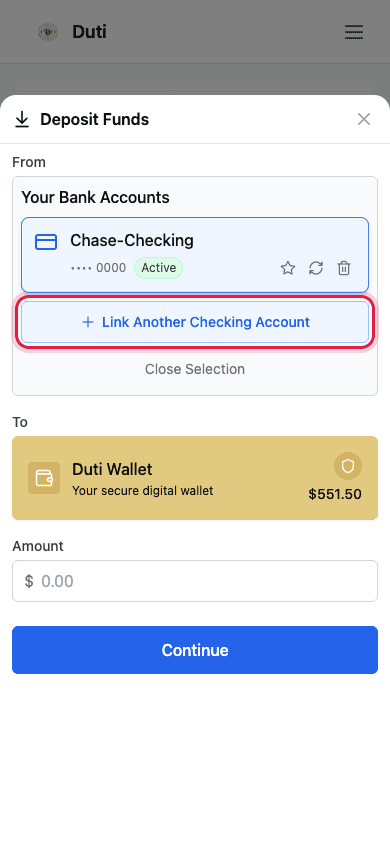
The Deposit sheet lists your connected banks — Link Another Checking Account starts a new connection.
Meet Plaid
A Plaid pane opens: “Duti uses Plaid to connect your account.” Plaid is the secure service Duti uses to talk to banks — thousands of apps rely on it. Tap Continue to move on. Adding your phone number is optional; it just speeds up future connections, and “Continue without phone number” works fine too.
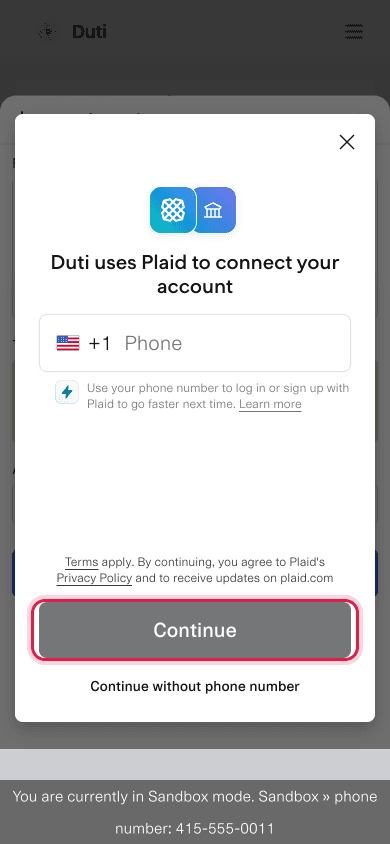
Plaid handles the connection — tap Continue (with or without your phone number).
Sign in at YOUR bank
Pick your bank from the list, then review what will be shared: your checking or savings details, account and routing numbers, account holder names, and basic profile info. Those account and routing numbers are exactly what lets Duti move your dues by ACH. Tap Continue to login and your bank's own sign-in page opens in a new tab — sign in there, approve the connection, and you're returned to Duti automatically.
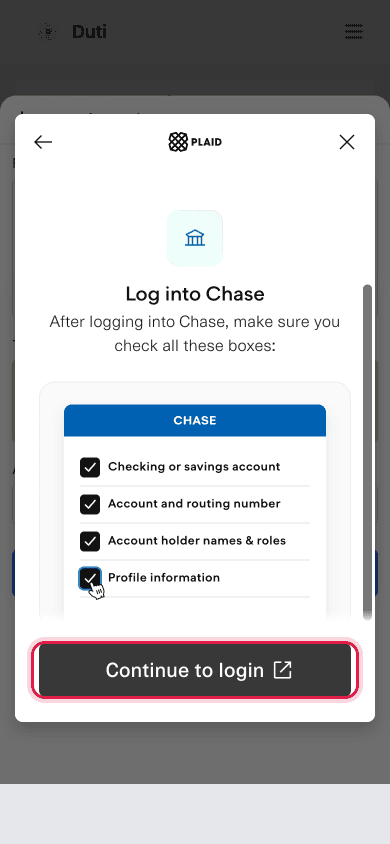
The example shows Chase — yours will show your own bank's login. Sign in there and approve.
Confirm it's connected
Back in Duti, your bank account card now shows a connected status along with its live available balance. That's the whole setup — you're ready to make your first deposit into your Duti Wallet.
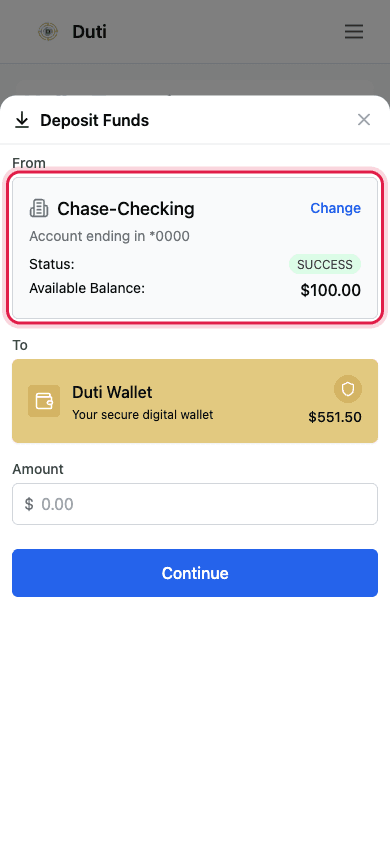
A connected status and a live balance mean the link worked — you can deposit now.
Good to Know
Duti never sees your bank password
You sign in on your bank's own page. Your credentials go straight to your bank through Plaid — Duti only receives secure tokens.
Checking accounts work best
Dues move by ACH transfer, so connect a checking account you actually keep funded.
One account is enough
You only need a single linked bank to use Duti. You can always link another later from the same Deposit sheet.
If it sticks on “inactive”
Rarely, a new link stays inactive — that means the instant verification failed silently. The fix is removing the account and linking it again; contact support if remove is blocked.
Common Questions
Yes — Plaid connects thousands of apps to banks and is built for exactly this. Duti receives secure tokens from Plaid, never your bank password.
That's your bank's own security (two-factor verification), not something Duti or Plaid adds. It's completely normal — enter the code and continue.
That's what an ACH transfer needs to move your dues between your bank and your circle. It's the same information on the share checklist you review before signing in at your bank.
Banks expire connections periodically as a security measure — it doesn't mean anything went wrong. Follow the reconnect-bank guide to refresh it in a couple of taps.