Check That Your Payment Was Recorded
Four quick checks that turn “did it go through?” into certainty
You tapped Confirm — now what? Every recorded circle payment leaves a clear paper trail in your Duti Wallet, and it takes under a minute to read it. This guide shows you exactly where to look, what a correctly recorded payment looks like, and what to do (and what NOT to do) if something seems off.
Your receipt is the transaction row
Open your Duti Wallet and look at Recent Transactions. A recorded circle payment appears at the top as its own row showing the circle name, the amount, and — critically — the Session it was recorded against. If that row is there with your circle and session, your payment is being tracked.
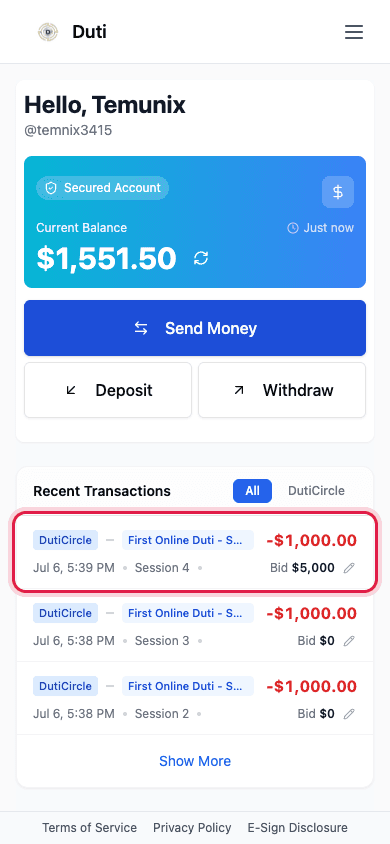
The top row is your receipt: circle name, amount, session, and bid.
The session number is what counts
A payment is “recorded” when it's attached to the right session — that's what marks your dues as paid. The session number was shown to you before you confirmed, right in the payment sheet's To row. It should match the session you see in the transaction row.
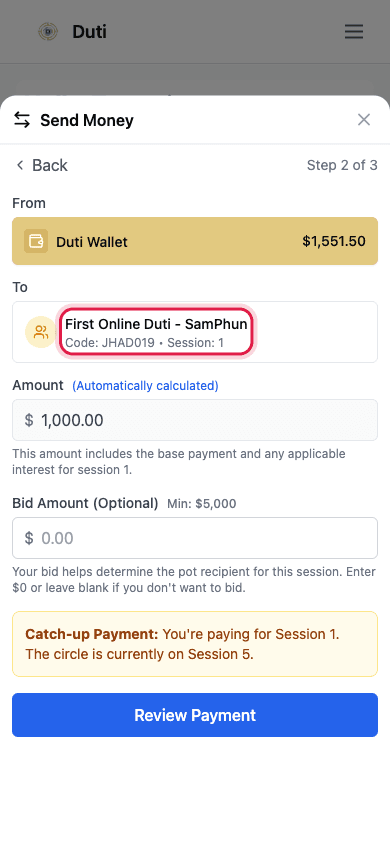
The payment sheet showed the target session before you sent — it should match the row.
Cross-check with what you confirmed
The review screen you approved showed everything in one place: the circle, the session number, and the total. If the transaction row matches what that screen showed, you're recorded — circle, session, and amount all line up.
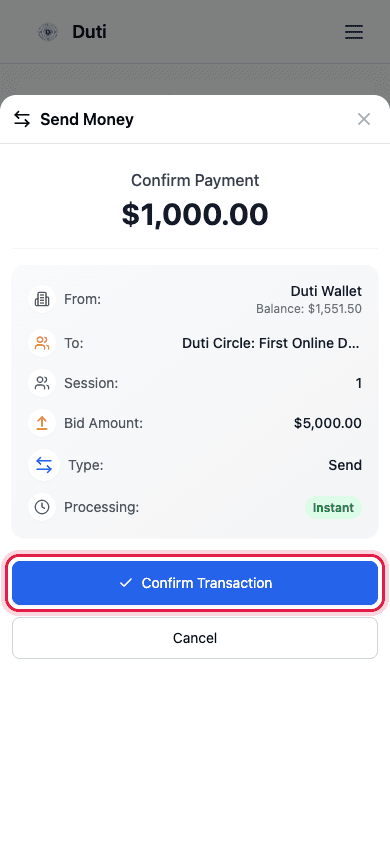
The Confirm Payment screen is what you agreed to — the row should mirror it.
Balance moved = money moved
For wallet payments, your Current Balance drops by the payment amount immediately. If the balance moved but no transaction row appears — or the row shows the wrong session — contact support with a screenshot. Do NOT pay again.
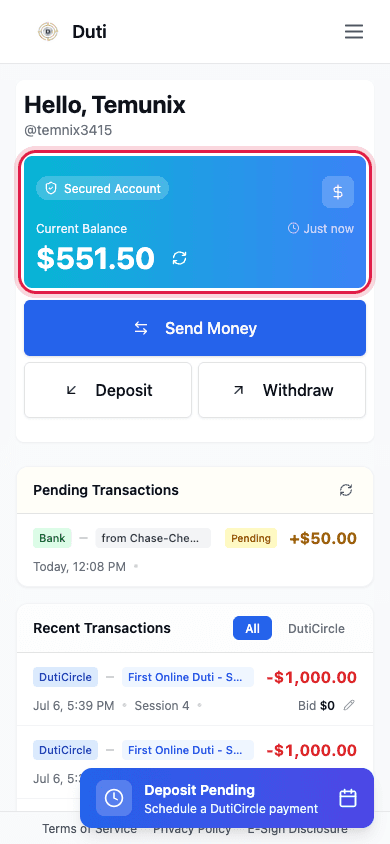
Your Current Balance reflects a wallet payment the moment it goes through.
Good to Know
Never double-pay to “fix” it
If something looks off, the worst move is paying again. The app blocks same-session double payment with an “Already Paid” state, but catch-up situations can be confusing — screenshot and ask.
Pending vs completed
A payment may show as pending briefly. Wallet-to-circle payments are instant and normally complete right away.
The dashboard agrees
Your circle's dashboard rounds view marks the session paid — it may take a refresh to catch up.
Bank deposits are different
Money coming INTO your wallet from your bank takes 1–2 business days and currently doesn't show while processing. That's a deposit, not a circle payment.
Common Questions
Refresh first — the dashboard caches. If it persists past a few minutes, contact support: payment records occasionally need manual linking and support can fix it quickly. Do not pay again.
Open the row's Edit bid pencil to check the recorded bid. You can update it while bidding is open.
Duti records payments against your oldest unpaid session first — see the catch-up guide for how that works.
That session is covered — there's nothing more to send for it.
The Recent Transactions row plus your wallet balance — those two let support trace everything.