Catch Up on a Missed Circle Payment
Behind on a session? Here's how to get current
Life happens — a busy month, a bank hiccup, a session that slipped by. Falling behind on a circle payment isn't a crisis, and getting current is simple: you make the same payment you always do, and Duti takes care of the rest. This guide shows how Duti flags a catch-up payment, which session each payment settles, and how to repeat the flow until you're all caught up.
Duti spots it for you
Start a normal circle payment: open your Duti Wallet, tap Send Money, and choose your circle. There's nothing special to find or request — if you're behind, an amber Catch-up Payment note appears right on the payment sheet. It tells you which session this payment settles and which session the circle is currently on, so you always know exactly where you stand.
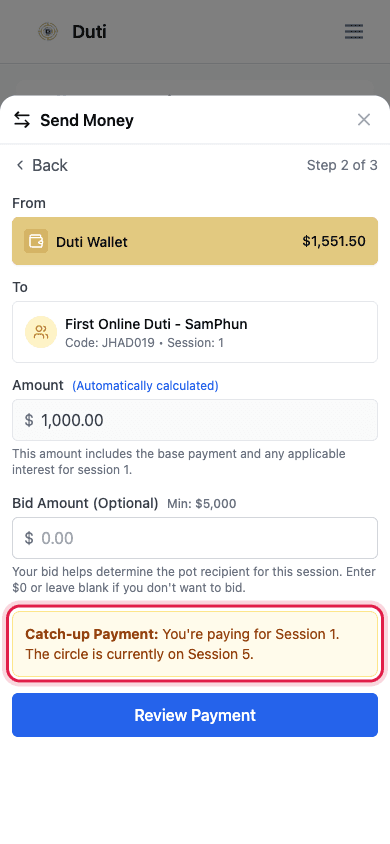
The amber note shows the session you're settling and where the circle currently is.
Oldest session first, always
Look at the To row: the Session number under the circle name is the session this payment settles. Duti always clears your oldest unpaid session first, so your payment record fills in order — no gaps, no guesswork about where your money went.
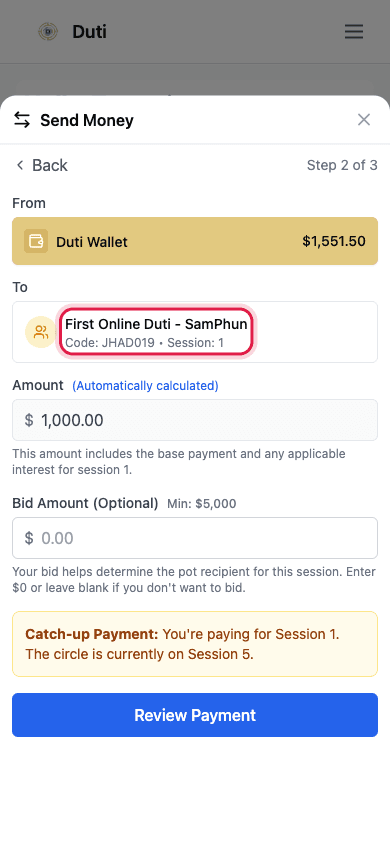
The Session number in the To row is the session this payment settles.
- The session shown is your oldest unpaid session — not necessarily the current one
- Payments always apply in order, so your record fills from the back
- You can't accidentally pay the wrong session — Duti picks it for you
Confirm like a normal payment
The review screen is the same one you see for any circle payment. The amount is simply that session's dues — the base payment plus that session's interest — not a penalty or extra charge. When everything looks right, tap Confirm Transaction.
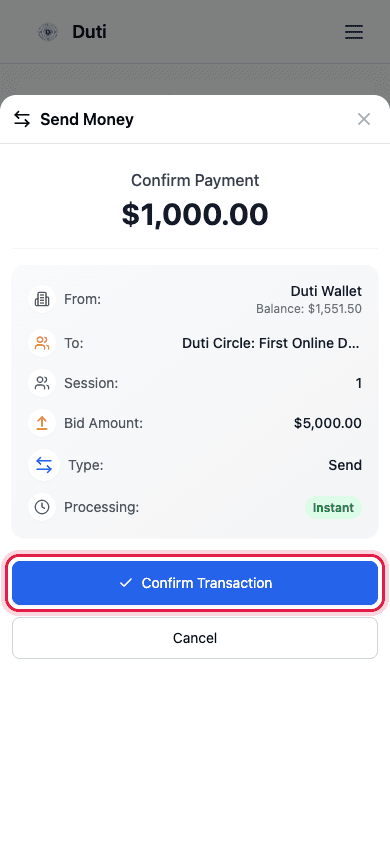
The amount is that session's regular dues — there's no added penalty.
Repeat until the note disappears
Each payment lands at the top of Recent Transactions with its session number, so you can see exactly which session it settled. If you're behind by more than one session, just run the same flow again — Send Money, choose your circle, confirm — for the next session. When the Catch-up Payment note stops appearing, you're current.
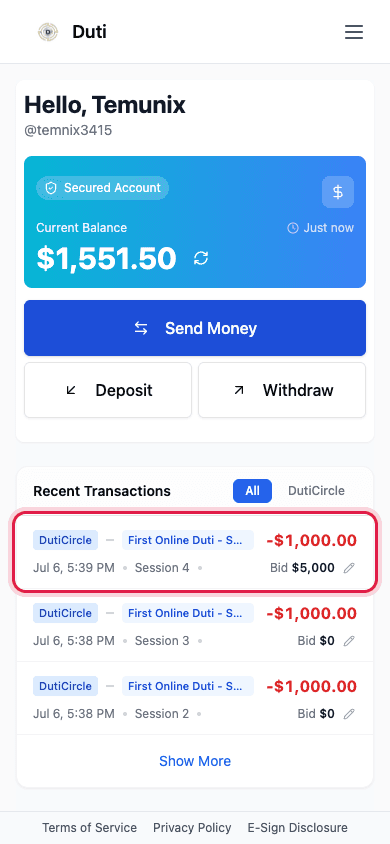
Each catch-up payment shows in Recent Transactions with the session it settled.
Good to Know
One session per payment
Each Send Money settles exactly one owed session. If you're three sessions behind, you'll make three payments.
Each session keeps its own price
Every catch-up uses that session's own amount, which grows slightly from session to session — so later sessions cost a little more.
Auto-pay won't backfill
Auto-pay covers upcoming sessions only. Catching up on missed sessions is always a manual payment.
Bidding while behind
You can usually add a bid only for the current session's pot, once you're paying it. If the bid field is missing on a catch-up payment, that's why.
Common Questions
The Catch-up Payment note shows which session you're settling versus where the circle currently is — pay repeatedly until it stops appearing. Your circle dashboard's rounds also show which sessions are paid and unpaid.
The app charges the session amount shown on the payment sheet. Some circles track late fees under their own rules, so ask your circle organizer about their policy.
Not yet — today each payment settles one session, so you'll run the flow once per owed session. It only takes a minute each time.
It can't — Duti links each payment to your oldest unpaid session automatically. If something looks wrong in Recent Transactions, contact support with a screenshot and they'll sort it out.