Auto-Pay Setup
Never miss a payment
Auto-Pay ensures you never miss a circle payment by automatically transferring funds from your bank account before each payment is due.
Find Auto-Pay in the Duti Wallet
- 1Log in to your Duti account
- 2Tap Duti Wallet from the menu
- 3Scroll to the bottom of the wallet screen — the Auto-Pay row sits below Recent Transactions
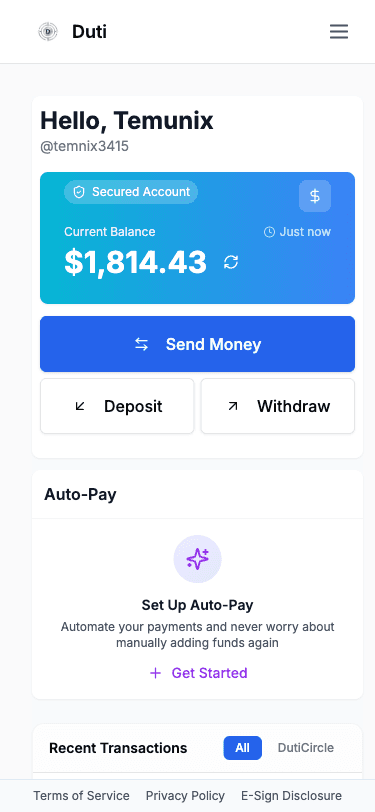
The Auto-Pay row at the bottom of the wallet shows a quick summary (for example "Auto-Pay · 2 active · ~$1,022/mo") with a Manage link. If you have no auto-pays yet, you'll see a "Put your dues on Auto-Pay" banner with a Start button instead.
Open the Auto-Pay Manager
Tap "Manage" on the Auto-Pay row (or "Start" on the banner) to open the Auto-Pay manager, where you manage your automatic payments.
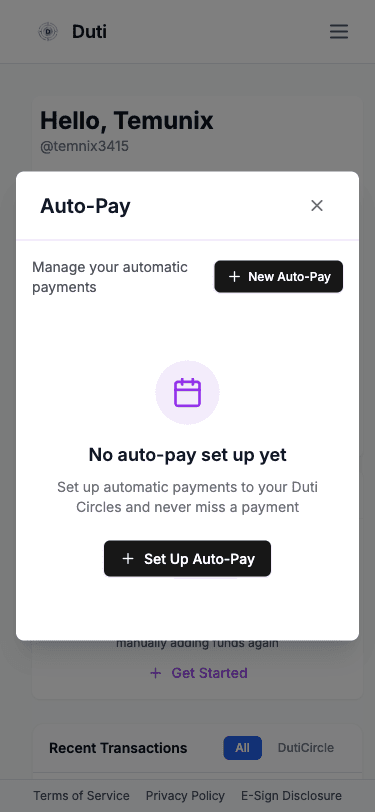
Each auto-pay has its own card showing the circle name, an Active or Paused chip, your bank account and success rate, the amount, frequency, and next deposit date — with Edit, Pause, and Delete actions. Tap "New Auto-Pay" to add one.
Select Your Circle
Tap "New Auto-Pay" in the manager to start the Set Up Auto-Pay wizard.
Step 1: Select Circle — choose which Duti Circle you want to set up auto-pay for:
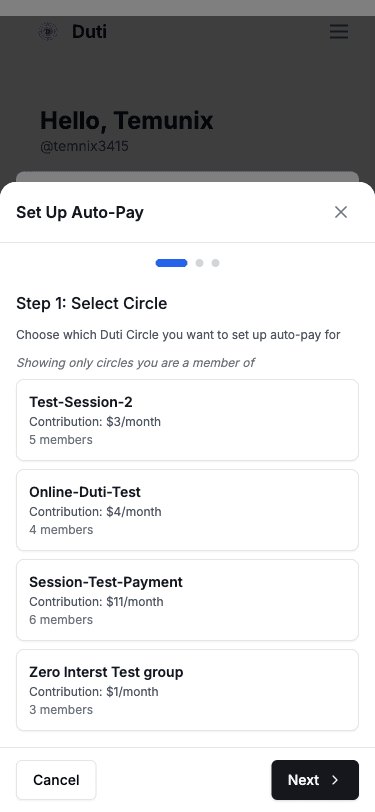
- Only circles you are a member of will appear
- Each card shows the circle name, monthly contribution amount, and member count
- Tap on a circle to select it, then tap Next
Configure Schedule
Step 2: Schedule — choose when auto-pay runs:
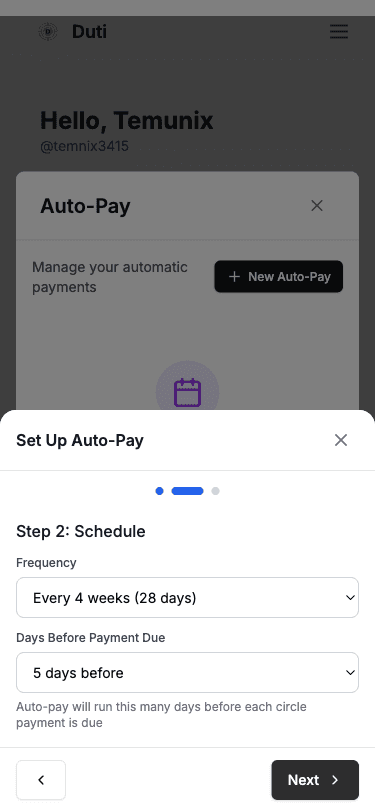
Frequency
Locked to "Every 4 weeks (28 days)" so deposits align with your circle's payment schedule
Days Before Payment Due
Choose 1-7 days before payment is due. Default is 5 days, giving time for ACH processing.
Schedule Preview
Shows your next payment due date (with its session number) and the exact date your auto-pay will run.
Review and Confirm
Step 3: Review — check your auto-pay configuration:
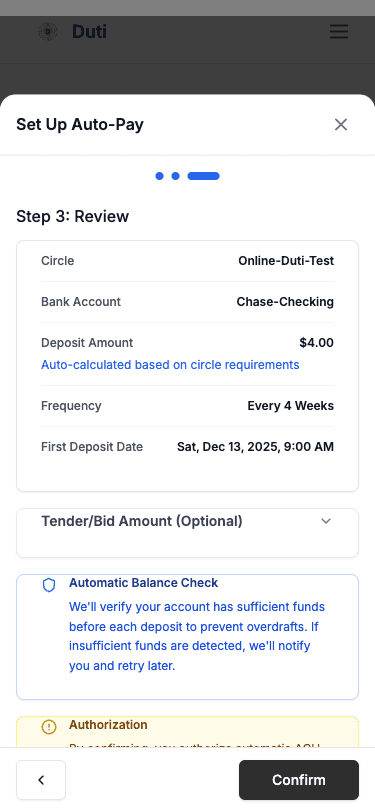
Circle
The selected Duti Circle
Bank Account
Your linked bank account
Deposit Amount
Auto-calculated based on circle requirements
Frequency
Every 4 weeks
First Deposit Date
When the first auto-pay will run
Tender/Bid Amount
Optional — expand to add a bid
✓ Automatic Balance Check: we'll verify your account has sufficient funds before each deposit to prevent overdrafts. If insufficient funds are detected, we'll notify you and retry later.
✓ Authorization: by confirming, you authorize automatic ACH withdrawals.
Tap "Confirm" to activate your auto-pay.
Managing Auto-Pays
Pause
Tap Pause on an auto-pay's card to temporarily stop automatic payments. The card switches to a Paused chip and your settings are retained.
Resume
A paused card shows a Resume button in place of Pause — tap it to reactivate the auto-pay.
Edit
Tap Edit on the card to modify timing, days before payment, or bid amount.
Delete
Tap Delete on the card to permanently remove an auto-pay configuration.
How It Works
Schedule Alignment
Runs on a 4-week cycle aligned with your circle
Balance Check
We verify funds via Plaid before each deposit
Automatic Transfer
ACH transfer initiated if funds are sufficient
Notifications
Email updates for all deposit events
Limits
Maximum deposit
$10,000 per transaction
Processing time
0-1 business day
Common Questions
Yes, one per circle you're a member of.
We'll notify you and retry later.
The amount is auto-calculated. You can add an optional bid.
Open the Auto-Pay manager and tap "Delete" on that auto-pay's card.